
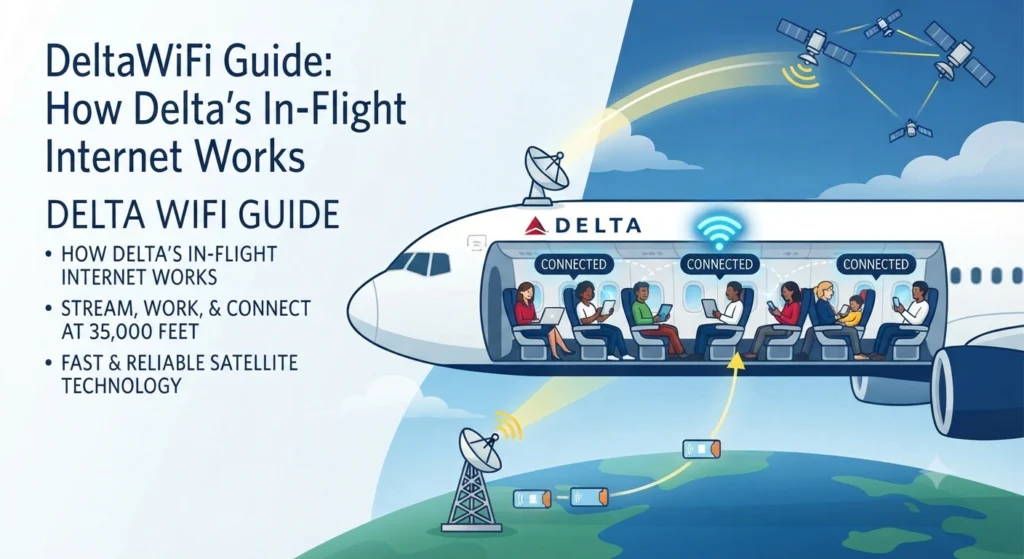
DeltaWiFi Guide: How Delta’s In-Flight Internet Works.
Introduction
Staying connected during a flight has become a normal part of modern air travel. For passengers flying with Delta Air Lines, DeltaWiFi provides a way to access the internet while onboard instead of waiting until landing to check messages, email or other online services.
Delta’s current Wi-Fi experience is centered around Delta Sync Wi-Fi, presented by T-Mobile. Delta says fast, free Wi-Fi is available to SkyMiles members on most domestic and international flights, while the airline continues expanding coverage to additional aircraft and routes. Availability can still vary depending on the aircraft and flight.
Understanding the DeltaWiFi login process, network availability and device requirements can make connecting much easier. This guide explains what DeltaWiFi is, how it works, how to connect, what you can do online and what to try if the connection does not appear.
What Is DeltaWiFi?
DeltaWiFi is Delta Air Lines’ onboard Wi-Fi service. Passengers can connect compatible smartphones, tablets and computers to the aircraft’s Wi-Fi network and then access the appropriate Delta Wi-Fi portal.
The current experience on equipped aircraft is known as Delta Sync Wi-Fi. Delta presents the service as fast, free connectivity for SkyMiles members and has been progressively installing it across its fleet. According to Delta, more than 1,200 aircraft had Delta Sync Wi-Fi by May 2026.
Not every aircraft necessarily provides the same experience. Some planes still use Wi-Fi Onboard, formerly associated with Gogo, while Delta continues its transition toward broader free Wi-Fi availability.
DeltaWiFi at a Glance
| Feature | Current information |
|---|---|
| Airline | Delta Air Lines |
| Wi-Fi experience | Delta Sync Wi-Fi |
| Connectivity presentation | T-Mobile |
| Main network name | DeltaWiFi.com |
| Free access | Available to SkyMiles members on supported aircraft |
| Devices | Phones, tablets and laptops |
| Messaging | Supported on compatible services |
| Streaming | Available on supported Delta Sync aircraft |
| Coverage | Most domestic and international flights, with rollout continuing |
| Alternative service | Wi-Fi Onboard on some aircraft |
| Login portal | DeltaWiFi.com |
Because aircraft equipment differs, passengers should check the Wi-Fi information associated with their specific flight rather than assuming every Delta aircraft has identical connectivity.
How Does DeltaWiFi Work?
DeltaWiFi uses onboard aircraft connectivity equipment to provide passengers with internet access while they travel. Depending on the aircraft and route, the underlying connectivity can differ.
From the passenger’s perspective, however, the process is relatively simple. You connect your device to the aircraft’s Wi-Fi network, open the Delta Wi-Fi portal and follow the instructions shown on the screen.
Delta currently directs passengers to select “DeltaWiFi.com” from the available networks. If the login page does not appear automatically, Delta recommends entering deltawifi.com in a browser.
Once connected to Delta Sync Wi-Fi, eligible SkyMiles members can sign in with their account. People without a SkyMiles account can also join the program for free through the onboard experience on supported flights. Depending on the aircraft, a paid Wi-Fi flight pass may also be available.
How to Connect to DeltaWiFi
Getting online usually takes only a few steps.
Step 1: Enable Airplane Mode
After the aircraft is ready for Wi-Fi use, turn on Airplane Mode on your smartphone, tablet or laptop.
You can then manually turn Wi-Fi back on while keeping cellular connectivity disabled.
Step 2: Select DeltaWiFi.com
Open your device’s Wi-Fi settings and look for DeltaWiFi.com.
Select that network and wait for the connection to establish.
Step 3: Open the Login Portal
In many cases, the Delta Wi-Fi page will appear automatically.
If nothing happens, open your browser and enter deltawifi.com. Delta says this should direct passengers to the appropriate Delta Sync Wi-Fi login experience when the aircraft supports it.
Step 4: Sign In
A Delta Sync-equipped aircraft can redirect you to the Delta Sync experience.
SkyMiles members can sign in using their account credentials. New users can enroll in SkyMiles for free, while certain aircraft may offer a paid Wi-Fi flight pass.
Step 5: Start Browsing
Once authentication is complete, you can use the available internet services supported by your flight.
Messaging, email, web browsing and streaming can be available depending on the aircraft and connection.
Is DeltaWiFi Free?
DeltaWiFi can be free for SkyMiles members on supported Delta flights.
Delta’s current policy says fast, free Delta Sync Wi-Fi is available to SkyMiles members on most domestic and international flights. The airline is still working toward providing the service across its entire fleet.
Some aircraft continue to use another onboard Wi-Fi system during the transition. Those flights may require passengers to purchase a Wi-Fi flight pass for broader internet access.
Free messaging is also available on flights with Wi-Fi capabilities, according to Delta’s onboard Wi-Fi information.
For that reason, checking your specific flight is important before assuming that free streaming-quality internet will be available.
Do You Need a SkyMiles Account?
A SkyMiles membership is important if you want to use Delta Sync Wi-Fi for free on eligible flights.
Delta allows passengers to enroll in SkyMiles without paying a membership fee. Once the account exists, passengers can use their credentials to sign into Delta Sync Wi-Fi on supported aircraft.
Passengers who are not SkyMiles members may encounter different options depending on the aircraft. Some flights provide the ability to purchase Wi-Fi access rather than requiring a membership.
Creating a SkyMiles account before the trip can therefore make the onboard login process simpler.
How Many Devices Can Connect to DeltaWiFi?
Delta says passengers can connect an unlimited number of devices to free Delta Sync Wi-Fi by logging into the SkyMiles account on each device.
That can be useful for travelers carrying more than one device.
For example, someone traveling for work could connect a laptop for email, a phone for messaging and a tablet for entertainment. Each device needs to go through the appropriate connection process.
The actual experience can still depend on the aircraft’s Wi-Fi system, so passengers should follow the portal instructions displayed during the flight.
What Devices Work With DeltaWiFi?
Delta’s Wi-Fi service supports most modern Wi-Fi-enabled devices.
Compatible equipment can include:
- iPhones and other smartphones
- Android phones
- iPads and tablets
- Windows laptops
- Mac laptops
- Other Wi-Fi-enabled personal computers
Delta specifically states that most Wi-Fi-enabled Android, iOS, macOS and Windows devices can connect.
Before traveling, keeping your browser and operating system reasonably updated can help avoid compatibility problems.
What Can You Do With DeltaWiFi?
DeltaWiFi is designed for more than basic browsing.
Messaging
Passengers can use supported messaging applications such as iMessage, Facebook Messenger and WhatsApp on compatible devices. Delta also supports SMS under certain device conditions.
SMS functionality can take longer to become available, and Delta notes that Wi-Fi calling must be enabled for SMS to function during the flight.
Email and Web Browsing
Regular web browsing and email can be useful during a long flight.
Business travelers can check work messages, review documents stored online or communicate with clients when the connection supports those activities.
Streaming
Delta Sync Wi-Fi is designed to provide streaming-quality connectivity on supported aircraft. Delta describes its newer Wi-Fi service as capable of supporting streaming entertainment.
Actual performance can vary because aircraft, route and network conditions are not identical.
Delta Sync Content
Connectivity also forms part of the broader Delta Sync onboard experience.
Delta has expanded Delta Sync with entertainment, partner content and other digital experiences for passengers. The company has announced integrations involving media and streaming partners as part of the platform.
Why Is DeltaWiFi Not Available on Every Flight?
Delta is still completing its fleet-wide Wi-Fi rollout.
The airline says free Wi-Fi is available on most domestic and international flights, but some international and regional aircraft are still being upgraded. As a result, passengers can experience different Wi-Fi systems depending on the plane operating their flight.
Coverage can also vary by geographic area.
Delta has stated that its connectivity network covers much of the globe, while some regions and routes continue to receive expanded coverage.
A connecting itinerary can therefore involve different Wi-Fi experiences on different aircraft.
How to Check Whether Your Delta Flight Has Free Wi-Fi
Checking ahead can save time.
Delta provides several indicators for flights equipped with its fast, free Wi-Fi. The airline says the booking process can display a Wi-Fi indicator, while pre-flight communications and airport signage may also identify aircraft offering fast, free Wi-Fi for SkyMiles members.
You can also check Delta’s onboard Wi-Fi information or ask a flight attendant once onboard.
A useful approach is to verify the service for the specific aircraft and flight, especially when traveling on a regional or international route.
What to Do If DeltaWiFi Will Not Connect
Connection problems can happen even when Wi-Fi is available.
Try these troubleshooting steps before assuming that the service is unavailable.
1. Confirm Airplane Mode
Make sure Airplane Mode is active and Wi-Fi has been manually turned back on.
This setup follows Delta’s standard connection instructions.
2. Select the Correct Network
Look for DeltaWiFi.com rather than connecting to an unrelated public network.
The network name is an important part of the authentication process.
3. Open the Portal Manually
If the login page does not appear, open your browser and enter deltawifi.com.
Delta specifically recommends this approach when the portal fails to load automatically.
4. Forget and Reconnect
When the network appears connected but the portal remains stuck, forget the Wi-Fi network from your device settings.
Reconnect afterward and try opening the portal again.
5. Check VPN or Private Relay Settings
Certain privacy or network-routing tools can interfere with captive Wi-Fi portals.
Delta notes that Apple’s Private Relay can interfere with access to some Delta Sync offers and content. The airline recommends turning it off when necessary.
A VPN can also affect how a device reaches an authentication portal, so connecting to DeltaWiFi before activating a VPN may help.
6. Ask the Crew
Flight attendants can help passengers determine whether the aircraft has an active Wi-Fi service.
If the aircraft itself has a connectivity issue, changing settings on your device may not solve the problem.
Is DeltaWiFi Safe to Use?
Delta states that its aircraft Wi-Fi hardware and software have undergone FAA testing and certification. However, passengers should still treat onboard Wi-Fi as a public network and take sensible precautions with sensitive information.
Avoid opening suspicious links or downloading unknown files while connected.
Sensitive transactions should also receive additional attention. Using strong account passwords, device security and appropriate encryption can reduce unnecessary exposure when using public or shared networks.
Can You Make Voice Calls on DeltaWiFi?
No.
Delta’s onboard Wi-Fi information states that voice and video calls are not permitted during flight, including calls through Wi-Fi or VoIP services.
Messaging is a different matter. Supported messaging services can be used on compatible flights and devices.
That distinction matters because having internet access does not mean every internet-based communication service is permitted onboard.
DeltaWiFi vs. Traditional In-Flight Wi-Fi
Delta’s current Wi-Fi rollout represents a shift from the older paid or limited connectivity model toward broader free access for SkyMiles members.
| Area | Delta Sync Wi-Fi | Older/alternative Wi-Fi service |
|---|---|---|
| Access | Free for SkyMiles members on eligible aircraft | May require a pass |
| Streaming | Supported on equipped aircraft | Depends on service |
| Login | SkyMiles/Delta Sync portal | Separate Wi-Fi portal |
| Coverage | Expanding across Delta fleet | Still used on some aircraft |
| Messaging | Available | Free messaging available on Wi-Fi-equipped flights |
| Devices | Multiple devices supported | Depends on aircraft/service |
The distinction is not simply about price. Delta is progressively standardizing the onboard digital experience around Delta Sync.
What Is Delta Sync?
Delta Sync is broader than Wi-Fi alone.
The platform combines connectivity with digital entertainment, personalized experiences and partner content. Delta has continued expanding the ecosystem during 2026, including additional media and entertainment partnerships.
For passengers, that means the Wi-Fi portal can act as an entry point to more than ordinary internet access.
SkyMiles members may encounter exclusive content, partner offers and other experiences after signing in.
Who Can Benefit Most From DeltaWiFi?
DeltaWiFi can be particularly useful for travelers who need internet access during a flight.
Business Travelers
Email, online documents and messaging can make a long journey more productive.
Frequent Flyers
People who regularly fly Delta may appreciate having a familiar connection process across equipped aircraft.
Leisure Travelers
Streaming, social media, messaging and online browsing can make longer flights easier to manage.
Families
Parents can use supported internet services to communicate with family members or access appropriate online entertainment.
DeltaWiFi Limitations to Keep in Mind
Despite improvements, DeltaWiFi is not identical to a home broadband connection.
Aircraft location can affect coverage.
Different aircraft may use different Wi-Fi systems.
Some flights may still require payment for broader internet access.
Regional aircraft can have different availability while Delta continues its rollout.
Network performance can also vary based on demand and technical conditions.
Keeping those limitations in mind prevents unrealistic expectations when traveling.
DeltaWiFi and Privacy: Practical Tips
Using public connectivity responsibly is always worthwhile.
Consider the following habits:
- Use a strong password on important accounts.
- Keep your phone and laptop updated.
- Avoid suspicious links.
- Do not share sensitive information unnecessarily.
- Use trusted websites with HTTPS.
- Disconnect from the network when you no longer need it.
- Be careful when accessing confidential work documents.
- Follow Delta’s onboard connectivity rules.
These steps do not guarantee complete security, but they can reduce common risks associated with public internet access.
Frequently Asked Questions About DeltaWiFi
Is DeltaWiFi free?
DeltaWiFi is free for SkyMiles members on aircraft equipped with Delta Sync Wi-Fi. Delta says fast, free Wi-Fi is currently available on most domestic and international flights, although coverage continues to expand.
How do I log into DeltaWiFi?
Turn on Airplane Mode, enable Wi-Fi, select DeltaWiFi.com, then open the Delta Wi-Fi portal. If the page does not appear automatically, enter deltawifi.com in your browser.
Do I need a SkyMiles account?
A SkyMiles account is required to use free Delta Sync Wi-Fi on eligible flights. Delta allows passengers to join SkyMiles for free through the onboard experience.
Can I connect multiple devices?
Yes. Delta says SkyMiles members can connect an unlimited number of devices to free Delta Sync Wi-Fi by logging into their account on each device.
Can I stream video on DeltaWiFi?
Streaming-quality connectivity is available on supported Delta Sync aircraft. Actual performance can vary by aircraft, route and network conditions.
Why is DeltaWiFi not working?
Check that your device is connected to DeltaWiFi.com, then open deltawifi.com manually. Forgetting and reconnecting to the network can also help. VPN or privacy-routing settings may interfere with the authentication process.
Final Takeaways
DeltaWiFi has evolved into a broader part of Delta’s onboard digital experience through Delta Sync Wi-Fi. SkyMiles members can access fast, free internet on many eligible flights, while Delta continues upgrading aircraft that do not yet offer the same service.
The basic connection process remains straightforward: enable Airplane Mode, switch Wi-Fi back on, select DeltaWiFi.com and follow the onboard portal instructions.
Before your journey, checking the Wi-Fi availability for your specific flight is worthwhile. Aircraft equipment can still differ, particularly on some regional and international services.
For travelers who depend on internet access for work, communication or entertainment, knowing the DeltaWiFi process in advance can make the onboard experience much smoother.