
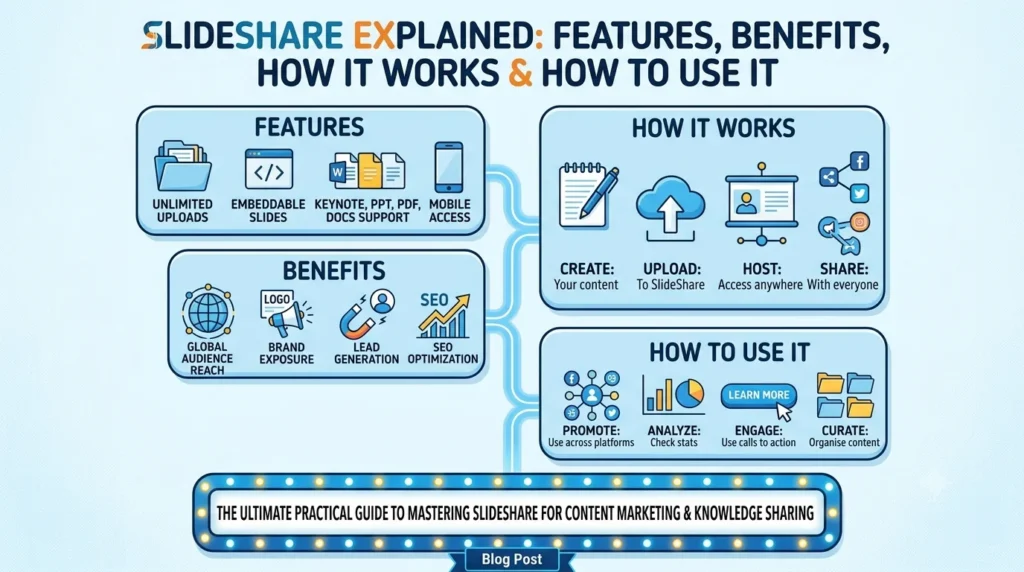
SlideShare Explained: Features, Benefits, How It Works and How to Use It.
Introduction
Sharing knowledge online has become an important part of education, professional development and business communication. Presentations, research documents, training materials and visual guides can help people understand complex subjects without reading lengthy reports. One platform associated with this type of content is SlideShare.
SlideShare is an online platform where users can discover, read and share presentations and documents covering subjects such as marketing, business, technology, education, careers and personal development. It can be useful for students looking for study resources, professionals researching industry topics, educators preparing learning materials and businesses showcasing their expertise.
However, SlideShare offers more than a collection of presentation slides. It can also help creators distribute knowledge, introduce their work to new audiences and organise information into an accessible visual format.
The platform has evolved over time. SlideShare was previously part of LinkedIn, but Scribd subsequently acquired it. Its current website offers free access to browse and read content, with certain features, including presentation downloads, available through a paid subscription. Features and subscription terms can change, so users should check the official website for current details.
This guide explains what SlideShare is, how it works, its features, how to upload and access presentations, its benefits for students and businesses, and how to use it effectively.
Quick Answer: What Is SlideShare?
SlideShare is an online presentation and document-sharing platform that allows people to discover, read and publish educational and professional content. It hosts material in areas such as business, marketing, technology, education and career development.
Users can explore existing presentations, learn from shared resources and upload their own documents. Supported upload formats include PowerPoint files, PDFs and Word documents, although the accepted formats and available features should be checked on the current upload page.
SlideShare can be useful for research, learning, professional knowledge-sharing and content distribution. However, users should verify information before relying on it because uploaded material can vary in accuracy, quality and publication date.
1. What Is SlideShare?
SlideShare is a content-sharing platform built around presentations and documents. It gives people a place to explore information published by other users and share their own professional or educational material.
Instead of presenting every idea through a traditional article, creators can use slides to organise information into short sections. A well-designed presentation might include headings, illustrations, charts, examples and concise explanations that help readers understand the subject.
For example, a digital marketing professional could publish a presentation explaining keyword research. A teacher might share revision notes, while a business consultant could create a visual guide to improving customer service.
What type of content is available?
SlideShare contains material covering a broad range of topics, including:
- Business and management: Business strategies, leadership, planning and operational processes.
- Digital marketing: SEO, social media marketing, paid advertising, branding and content strategy.
- Technology: Software concepts, digital tools, technical explanations and industry developments.
- Education: Study materials, classroom presentations, research summaries and learning resources.
- Career development: Interview preparation, professional skills, communication and workplace guidance.
- Research and analysis: Reports, case studies, data summaries and presentations explaining findings.
The quality and depth of the content depend on the individual creator. Some presentations offer detailed explanations, while others provide only a brief overview.
Is SlideShare part of LinkedIn?
SlideShare was acquired by LinkedIn in 2012. LinkedIn later announced that SlideShare content and document-sharing functionality would be integrated into LinkedIn profiles and pages, and that the standalone SlideShare website would be retired after January 31, 2020. However, SlideShare continued to operate as a separate website, and Scribd subsequently acquired it.
Today, users can visit SlideShare.net directly. Do not assume that every historical LinkedIn feature or older SlideShare tutorial reflects the platform’s current setup.
2. How Does SlideShare Work?
SlideShare connects people who want to discover useful information with people who want to publish and share it.
The basic process is straightforward: find relevant material, read or review it, and upload your own content if you want to contribute.
Step 1: Visit the website
Open www.slideshare.net in your browser.
The homepage provides access to presentations and documents covering different subjects. You can explore available material to discover ideas or find resources relevant to your work.
Step 2: Search for a topic
Use relevant search terms to locate presentations related to your interests.
For example, a small business owner might search for:
- Digital marketing strategy
- Small business financial planning
- Customer experience improvement
- SEO fundamentals
- Leadership development
More specific searches can help narrow the results. Instead of searching for “marketing”, try “content marketing strategy for small businesses”.
Step 3: Open and read a presentation
Select a presentation to view its content. Depending on the item and the platform’s current functionality, you may be able to review its slides, read accompanying information and access sharing options.
Check the creator’s name, publication date and supporting references when evaluating the material.
Step 4: Create or access an account when required
Some activities may be available without a subscription, while other features may require an account or paid access.
If you plan to upload documents or use additional features, follow the current account and subscription instructions on the official website.
Step 5: Upload your own content
Creators can upload supported presentation and document files through the SlideShare upload page.
Before publishing, check that the document is readable, correctly formatted and free from confidential information. Add an accurate title and description so readers can understand what the content covers.
Step 6: Share the published material
Once your content is available, use the sharing options provided by the platform. Depending on the available functionality, you may also be able to link to the presentation from a website, blog, professional profile or other communication channel.
Always check the current platform settings to confirm which sharing and embedding options are available.
3. Key Features of SlideShare
SlideShare provides several features designed to make professional and educational content easier to discover and share.
Presentation discovery
Users can explore presentations covering different subjects and industries. This makes the platform a useful starting point when researching a topic, looking for inspiration or studying how other people organise their ideas.
Search results should still be evaluated carefully. A presentation appearing prominently in search results does not automatically make its claims accurate.
Document and presentation uploads
SlideShare supports several common document formats. Its official upload page lists formats including PowerPoint, PDF and Word files, with accepted extensions such as PPT, PPTX, PPSX, POTX, PDF, DOC and DOCX.
The accepted formats may change, so consult the official upload page before preparing a file.
Sharing and distribution
Creators can publish material for other people to discover. This can help professionals distribute educational resources, showcase their knowledge and make presentations accessible beyond a live meeting or classroom.
The platform’s current sharing options should be checked before planning a distribution campaign.
Search engine discoverability
SlideShare’s upload page states that uploaded content can be indexed by Google and other search engines. This creates a potential discovery opportunity for useful public presentations.
Nevertheless, indexing is not a guarantee that a particular presentation will rank highly or generate substantial traffic.
Access to professional knowledge
The platform contains presentations from different industries and subject areas. Readers can use these resources to discover concepts, identify questions for further research and learn how other creators communicate information.
A presentation can provide a useful introduction, but it should not replace detailed research when a decision depends on current, specialised or high-stakes information.
Subscription-based features
SlideShare offers free access to browse, read and upload content, while some additional features are available through a subscription. The current website advertises presentation downloads and an ad-free experience among its paid benefits.
Check the official SlideShare website for current pricing, trial terms, cancellation conditions and feature availability before subscribing.
4. How to Create a SlideShare Account
If you want to publish content or access account-related features, follow the registration instructions displayed on the official website.
Basic account setup
- Visit the official SlideShare website.
- Select the sign-in or registration option available to you.
- Follow the displayed instructions to access or create your account.
- Complete any required verification steps.
- Review your profile information and available settings.
- Explore the features available to your account.
The exact registration process may change. Avoid relying on outdated tutorials that show a previous login system or assume that every historical LinkedIn connection still works in the same way.
Tips for setting up a professional profile
If you plan to publish presentations for professional reasons, use consistent and accurate profile information.
Consider including a clear professional description, your area of expertise and relevant links where the platform allows them. Your profile should help readers understand who created the material and why it may be useful.
Never include private contact information or confidential business details unless you have a clear reason to make them public.
5. How to Upload a Presentation to SlideShare
Uploading a presentation can help you distribute knowledge, showcase your work or make educational material available to a wider audience.
Step 1: Prepare your file
Create a presentation that answers a specific question or explains one clear topic.
For example, a presentation titled “SEO Basics for Small Businesses” should explain the fundamentals of SEO rather than attempt to cover every aspect of digital marketing.
Use a supported file format and check the latest requirements on SlideShare’s upload page.
Step 2: Review the design
Before uploading, check every slide for spelling mistakes, inconsistent formatting, missing images and unreadable text.
Keep headings clear and use visuals only when they help explain the subject. Dense slides can make the content difficult to read, especially on smaller screens.
Step 3: Open the upload page
Visit SlideShare Upload and follow the instructions to select or upload your file.
If the platform offers a supported cloud import option, you can use it according to the displayed instructions.
Step 4: Add a descriptive title
Choose a title that accurately explains the presentation’s subject.
For example, “Google Ads Budget Planning for Small Businesses” is more informative than “Marketing Presentation”.
A clear title helps readers understand what they will learn before opening the document.
Step 5: Write a useful description
Explain the presentation’s purpose, intended audience and main takeaways. Include relevant terms naturally, but avoid repeating keywords simply to influence search rankings.
A useful description sets realistic expectations and helps readers decide whether the resource matches their needs.
Step 6: Check visibility and publish
Review the available publication and visibility settings before completing the upload.
Make sure the document does not contain confidential client data, personal information, licensed material you do not have permission to distribute or internal business documents.
Once published, open the presentation and check that the content displays correctly.
6. How to Download Presentations
Some SlideShare users want to save presentations for offline reading, research or reference.
Download availability depends on the particular document and the platform’s current access rules. SlideShare currently advertises downloading presentations in their original file formats as a subscription benefit.
To check whether a presentation can be downloaded:
- Open the presentation on SlideShare.
- Look for the available download or access options.
- Review any subscription or account requirement displayed.
- Follow the official instructions if downloading is available.
- Save the file in an appropriate location and respect the creator’s usage terms.
If a download option is unavailable, do not assume that a third-party downloader is safe or authorised.
Can you reuse downloaded presentations?
Downloading a document does not automatically give you ownership of its content or permission to republish it.
Copyright restrictions may apply to text, images, charts, designs and other elements. If you want to reuse material in a blog post, training session, commercial presentation or public resource, check the licence and obtain permission when required.
You can learn from a presentation without copying its original work. Summarise ideas in your own words, verify the facts and cite sources where appropriate.
7. Who Can Benefit From SlideShare?
SlideShare can serve people with different learning, communication and professional goals.
Students and learners
Students can use presentations to review concepts, discover explanations and identify subjects for further study.
For example, someone learning business management may find a presentation that introduces strategic planning or explains common financial terms.
However, students should check the author’s credibility and confirm important facts through reliable educational sources.
Teachers and educators
Educators can use presentation-based content to explore teaching approaches, discover examples and prepare lessons.
They may also publish their own learning resources, provided the material respects copyright and institutional policies.
Marketing professionals
Marketing specialists can explore presentations about content marketing, SEO, paid advertising, audience research and brand strategy.
A useful presentation may introduce a framework or demonstrate how a campaign is organised. Before applying its recommendations, marketers should check whether the information remains relevant to current platforms and industry conditions.
Business owners
Business owners can use SlideShare to research business topics, explain their services and share educational material with potential customers.
For instance, a consulting firm might publish a guide to business planning, while an accounting practice could share an introductory presentation about financial reporting.
The content should educate readers rather than make unsupported promises about results.
Trainers and consultants
Professional trainers and consultants can use presentations to organise expertise into a format that clients or learners can review.
A well-structured document can support workshops, professional discussions and follow-up learning.
Researchers and professionals
People researching a subject can use SlideShare to discover presentations, case studies and summaries of industry ideas.
These documents can provide useful starting points, but research should be checked against original studies, official reports and other authoritative sources when accuracy matters.
8. Benefits of Using SlideShare for Businesses
SlideShare can be part of a broader content marketing and professional communication strategy. Its value depends on the quality of the content, the needs of the target audience and how the material is distributed.
Showcasing expertise
A detailed presentation can demonstrate that a business understands a particular subject.
For example, an SEO agency could publish a guide explaining keyword research, local search optimisation or website performance measurement. The goal should be to help readers understand the topic rather than simply promote services.
Reaching people interested in a topic
Presentations can attract readers who are researching a problem or learning about an industry.
A business-focused resource may be useful to potential clients who want to understand a process before speaking to a service provider.
However, publishing a presentation does not guarantee leads, enquiries or sales. Audience relevance and content quality remain important.
Repurposing existing content
Businesses often have useful information in blog posts, reports, webinars and training materials.
Some of that information can be transformed into a presentation with a distinct purpose. For example, a long guide about local SEO could become a concise checklist showing the main steps businesses should review.
Repurposing should involve adapting the content to the new format, not merely copying paragraphs onto slides.
Supporting sales conversations
A clear presentation can explain a service, process or proposal to a prospective customer.
It may help readers understand what a business offers and what questions they should ask before making a decision.
Avoid including confidential pricing details, client information or proprietary methods in publicly accessible material unless publication has been approved.
Creating reusable educational resources
A presentation can remain useful after a webinar, workshop or training session has finished.
Businesses can share relevant resources with their audience and direct readers to related articles or services where appropriate.
Keep the information updated when the subject changes, particularly if it involves software features, regulations or platform policies.
9. Does SlideShare Help With SEO?
SlideShare may support content discoverability, but its SEO value should be understood realistically.
The platform states that uploaded material can be indexed by search engines. This means a public presentation may appear in search results if it is accessible, relevant and eligible for indexing.
However, uploading a presentation does not guarantee higher Google rankings, backlinks, referral traffic or improved rankings for your own website.
How SlideShare can support discoverability
A presentation can introduce your expertise to people searching for a topic. If the content is genuinely useful, readers may explore your profile, visit your website or share the resource.
For example, an agency publishing a practical guide to local SEO could attract readers interested in improving their business’s online visibility.
The outcome depends on audience demand, content quality, competition and how easily people can find the presentation.
Optimise the presentation title
Use a clear title that reflects the subject and matches the reader’s likely search intent.
A title such as “Local SEO Checklist for Small Businesses” communicates the topic more effectively than a vague heading such as “Our Latest Guide”.
Include the main topic naturally instead of stuffing multiple keywords into the title.
Write a relevant description
Explain what readers will learn and who the presentation is intended for.
Use related terms where they fit naturally. More importantly, make sure the description accurately represents the document.
Create useful, original slides
Search visibility is only one consideration. The presentation should solve a problem, explain a process or provide a valuable summary.
Use clear headings, meaningful examples, readable text and credible references. Original material is more useful than a lightly edited copy of an existing presentation.
Use relevant links appropriately
If the platform permits links in your profile or presentation details, direct readers to relevant resources on your website.
For example, a presentation about Google Ads budgeting might point to a detailed budgeting guide or calculator. The destination should add value rather than send readers to an unrelated sales page.
Do not assume that every link from SlideShare will pass ranking value. Link attributes and search engine treatment can vary.
Measure actual results
If you use SlideShare for marketing, track meaningful outcomes where possible.
Useful measures may include:
- Presentation views and engagement, where available.
- Referral visits to your website.
- Enquiries or sign-ups associated with the content.
- Downloads or shares, when these metrics are available.
- The performance of related website pages in search results.
These measures can help determine whether the effort is reaching the intended audience. Avoid treating view counts alone as proof of business impact.
10. SlideShare vs LinkedIn Document Posts
SlideShare and LinkedIn document posts are related in their professional use, but they serve different publishing contexts.
| Feature | SlideShare | LinkedIn document posts |
|---|---|---|
| Main purpose | Discovering and sharing presentations and documents | Sharing documents directly with a LinkedIn audience |
| Content discovery | Browse and search material on SlideShare | Discover content through LinkedIn posts, profiles and pages |
| Typical use | Educational resources, presentations and professional knowledge-sharing | Industry insights, professional updates and audience engagement |
| Upload formats | Supported presentation and document formats listed on SlideShare | LinkedIn supports formats such as PDF, PPT, PPTX, DOC and DOCX, subject to its current requirements |
| Audience | People browsing SlideShare and its shared resources | LinkedIn members who can view the post |
| Download access | Depends on the document and SlideShare’s current access rules | Viewers may be able to download shared documents as PDFs |
| Best starting point | A resource designed for discovery on a presentation platform | A document intended to start a conversation with your LinkedIn network |
LinkedIn’s document-posting guidance explains how users can upload supported files to a post. Requirements can change, so check the official LinkedIn Help Centre before publishing.
Which platform should you choose?
Choose SlideShare when you want to publish a presentation within a platform focused on discovering and sharing documents.
Consider a LinkedIn document post when your priority is to distribute a document directly through your professional network and encourage discussion.
Depending on your goals and the current platform rules, you may be able to use both channels. Make sure each publication is formatted appropriately and that you have permission to distribute the content.
11. Is SlideShare Safe and Reliable?
SlideShare can be useful for learning and sharing information, but users should assess individual documents carefully.
The platform hosts material created by different people and organisations. As a result, presentations may differ in accuracy, completeness, originality and publication date.
Check the creator’s identity
Look at the author’s name, profile and available background information.
A recognised organisation or qualified professional may provide useful context, but a professional-looking profile is not conclusive proof that every claim is correct.
Verify the information
Check whether the presentation includes references, links to original research or explanations of where its figures came from.
When the material covers health, finance, law, security or other high-stakes topics, consult authoritative sources before acting on the information.
Review the publication date
Older presentations may describe products, platform settings, statistics or policies that have changed.
If the content relates to a rapidly changing subject, verify the information through current official documentation.
Be cautious with downloads and external links
Use the platform’s official download options and avoid suspicious third-party tools.
Before visiting an external link, check its destination. Never enter passwords, banking information or other sensitive details on an unfamiliar page simply because a presentation recommends it.
Respect copyright
Not every document uploaded to a sharing platform is free to reuse.
Check the relevant licence or permissions before copying, republishing or adapting material. If you are uncertain, ask the copyright holder or use content with clear reuse rights.
Protect confidential information when uploading
Before publishing a presentation, inspect every slide for client names, personal information, internal financial figures, private contact details and confidential business material.
Remove anything that should not be public. Also confirm that you have permission to share third-party charts, photographs and other copyrighted elements.
12. Best Practices for Creating Effective Presentations
A useful SlideShare presentation should be easy to understand, visually clear and focused on the reader’s needs.
Focus on one main objective
Decide what readers should understand or be able to do after reviewing the presentation.
A focused guide about preparing a marketing budget will generally be easier to follow than a document that mixes unrelated marketing subjects.
Use a logical structure
Organise the slides in a sequence that helps readers understand the topic.
A practical structure could include:
- Title and purpose.
- The problem or question being addressed.
- Key concepts or background.
- Step-by-step recommendations.
- Examples or supporting evidence.
- A summary and relevant next steps.
Adapt the sequence to the subject rather than forcing every presentation into the same template.
Keep the text readable
Avoid filling each slide with long paragraphs. Use concise explanations, clear headings and supporting visuals where appropriate.
Readers should be able to identify the main point without struggling to understand the layout.
Use accurate and current information
Check statistics, dates, examples and claims before publishing.
When you reference external research, provide enough information for readers to identify the original source. Correct errors when you discover them.
Design for different screens
People may read presentations on desktop computers, tablets or mobile devices.
Use a consistent layout, sufficient text size and clear contrast. Check the exported file to ensure that images and text remain readable.
Include a useful next step
Where relevant, finish with a summary, checklist, reference list or link to a more detailed resource.
For a business presentation, a relevant next step might be reading a related guide or contacting the organisation for further information. Keep the call to action appropriate to the content.
13. Common SlideShare Mistakes to Avoid
Publishing without reviewing the file
Formatting issues, spelling mistakes and missing images can reduce the usefulness of a presentation.
Review the final uploaded version, not just the original PowerPoint or Word file.
Using vague titles
A generic title gives readers little reason to open the document.
Describe the topic clearly and accurately so the intended audience can recognise its relevance.
Adding too much information to each slide
Dense slides make presentations harder to read. Break complicated ideas into manageable sections and use examples to explain unfamiliar concepts.
Treating SlideShare as a guaranteed SEO shortcut
Publishing a document does not automatically create valuable backlinks or improve rankings for your website.
Prioritise useful content and measure actual outcomes rather than relying on unsupported claims about ranking benefits.
Copying another creator’s work
Republishing someone else’s presentation without permission may violate copyright or licensing terms.
Create original material, use properly licensed assets and credit sources where appropriate.
Ignoring updates
A presentation can become outdated when tools, policies or industry practices change.
Review important documents periodically and update or replace information that is no longer accurate.
14. Final Thoughts
SlideShare remains a useful platform for discovering and sharing presentations, documents and professional knowledge. Its content covers subjects ranging from business and marketing to education, technology and career development.
Students can use it to explore learning resources, professionals can discover new ideas, and businesses can publish educational material that demonstrates their expertise. The platform may also support online discoverability, although SEO and marketing results are never guaranteed.
To get the most value from SlideShare, search for specific topics, assess the credibility of individual presentations and verify important claims. If you publish your own material, focus on clear explanations, accurate information, readable design and respect for copyright.
The most effective use of SlideShare is not simply uploading or collecting presentations. It is using well-organised information to help people learn something valuable and take an informed next step.
What is SlideShare used for?
SlideShare is used to discover, read and share presentations and documents. Common purposes include education, professional development, research, business communication and content distribution.
Is SlideShare free to use?
SlideShare offers free access to browse, read and upload content. Some additional features, including presentation downloads and ad-free browsing, are advertised as subscription benefits. Check the official website for current terms.
Do I need an account to view SlideShare presentations?
Some content can be browsed without a subscription, but access requirements may vary by feature or document. Check the current website if a presentation asks you to sign in or subscribe.
How do I upload a presentation to SlideShare?
Visit the official upload page, select a supported file, follow the upload instructions and provide the requested information. Review the document for formatting issues and confidential information before publishing.
Can I download SlideShare presentations?
Download availability depends on the presentation and current platform rules. SlideShare advertises downloads as a paid feature. Use the platform’s official options and respect the creator’s copyright.